



- 16 Feb, 2026
- AI Automation
- By Steve Marks
How I'm Running a Web Agency with AI Agents — Real Tools, Real Workflows, and Where I Still Call the Shots
There has been a lot of hype around Claude Code, Agentic AI and Openclaw. As someone who is working full time and trying to run a side hustle type business, I can see a lot of potential here for helping me manage things I don’t have time to manage, and experiement with things I don’t have time to experiment with. There’s a couple of perspectives in here - a technical perspective and a small/micro business perspective. I hope either perspective can be helpful to you.
I wanted to go through the building of a system that I hope will be helpful to me in managing some aspects of my business, and give you tips on how to do the same.
I’m not going to tell you it was easy to set up, or that it runs perfectly with zero input. But I will show you exactly what it looks like, what tools are involved, and why I think this approach is more sustainable than just throwing prompts at ChatGPT and hoping for the best.
The Setup
I run BVS Web Design alongside a full-time job as a technical trainer and coach. Time is a constraint. As, quite frankly, is cash. I can’t afford to go out and hire a team to function for me. So instead of hiring, I’ve built a stack of AI agents to handle some of the operations side — lead outreach, follow-ups, content, CRM updates, analytics analysis — while I focus on client work and strategy.
The core tools:
- VPS Server - I want this to be as cost effective as possible. I had built a mini CRM in Laravel and was hosting it on a VPS i. hostinger (I’m not affiliated - other VPS providers are available!) - so I already had this infrastructure available to me. I also have a bit of technical know how in setting it up, although I won’t pretend it was easy.
- n8n — because I already had a VPS, it made sense to run n8n on it. An open-source workflow automation, this is the orchestration layer. Every automated process runs through here.
- Ollama — At first I used Claude Code to do everything. But you quickly run out of tokens on the Pro plan. My idea was to hook my ‘brain’ up to Open Source models based on my laptop. Free inference, no API costs, completely private.
- A custom Laravel CRM — built specifically for this operation, with a full REST API so agents can read and write data programmatically.
- OpenClaw - absolutely critical to this working is Openclaw, which manages my OpenSource agents, checks their work, and sends it to me via email, or via the CRM, depending on the task. Openclaw does use Claude Code, using the Sonnet Model.
- Tailscale - I need my laptop and my VPS to talk to each other - they do this through Tailscale.
These three things working together is where most of the leverage comes from. n8n is the plumbing, Ollama is the brain, and the CRM is the single source of truth that everything reads from and writes to.
One thing I will say is that I’m not pretending this is the most secure setup - I do have to be mindful of exposing API keys and giving OpenClaw too much access to my personal stuff.
The Workflows
Here’s what’s actually running:
1. Lead Research & Enrichment
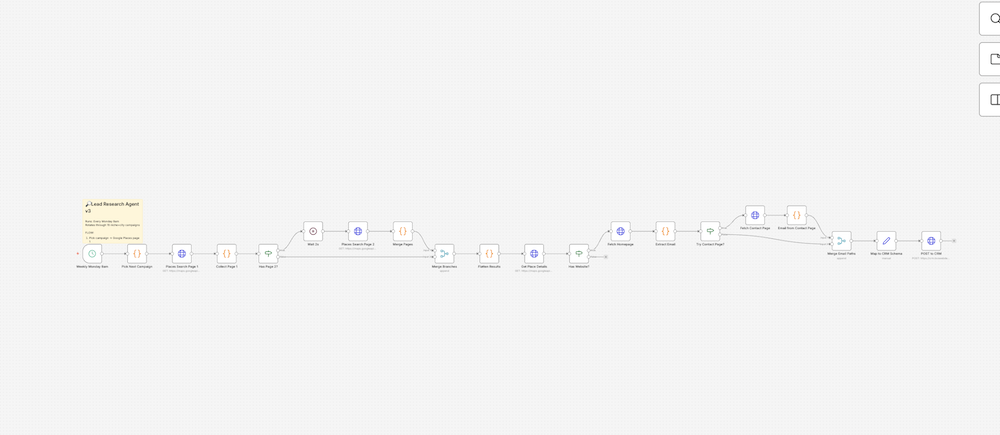
When a new lead enters the system, an n8n workflow fires automatically. It pulls business information, validates the data, scores the lead against my target niches — dentists, trades, beauticians, wedding boutiques — and populates the CRM with everything it finds. What used to take 20 minutes of manual research per lead now takes a few seconds, and the data is structured consistently every time.
2. Cold Outreach Pipeline
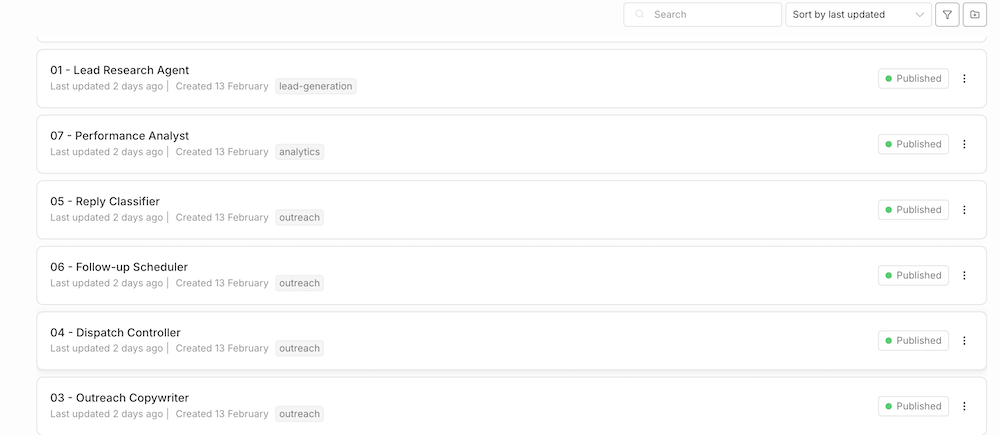
This is the biggest piece. Seven workflows handle the full outreach sequence: sourcing leads, generating personalised email copy via Ollama, dispatching through Zoho, tracking opens and replies, and queuing follow-ups based on interaction data pulled from the CRM API.
The email copy isn’t generic — Ollama pulls context about the lead’s niche, their likely pain points, and which case study is most relevant before it writes anything. A dentist gets a different email to a construction firm, and both feel written by a human who did their homework.
The dispatch controller runs on a schedule. I don’t touch it day-to-day.
3. Follow-Up Sequencing
Following up is where most solo operators fall down. Not because they forget — because remembering to follow up on 40 leads at exactly the right interval is genuinely hard to do manually.
The follow-up workflow checks the CRM daily for any leads where a follow-up is due, pulls the interaction history, and either sends the next email in the sequence or flags the lead for manual review if something unusual has happened — like a reply that needs a human response.
4. Content Pipeline
Blog posts, LinkedIn drafts, and a client newsletter all run through a content pipeline. A brief goes in — topic, target audience, key points — Ollama drafts the content, and it lands in a review queue. Nothing goes out without me reading it, but I’m reviewing and editing rather than staring at a blank page.
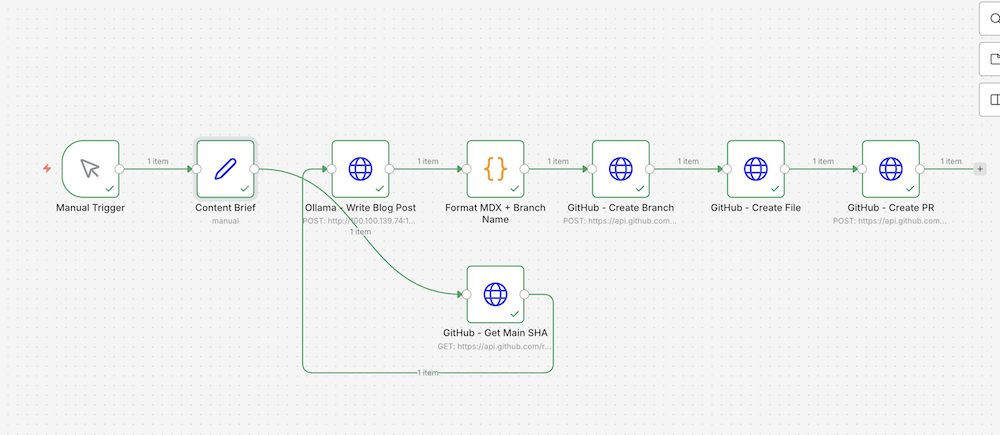
For the blog specifically, approved posts are submitted as a GitHub pull request against the site repo. I merge when I’m happy, and Netlify deploys automatically. The whole thing from brief to live post can happen in under an hour when I’m not precious about it.
5. Call Prep
Before any sales call, a workflow pulls the lead’s full CRM history — every interaction, every email sent, any notes — and generates a briefing document. I walk into every call prepared, with context I’d otherwise have to manually dig out.
The Human Checkpoints
This is the part people skip over when they talk about AI automation, and it’s probably the most important bit.
Every workflow that touches a customer has a human gate.
Email copy gets reviewed before the dispatch controller goes live. Blog posts go through a pull request — I merge when I’m happy with them. Newsletter drafts land in a review queue for approval. Leads that respond to outreach get flagged for me to handle personally.
AI is fast and cheap at generating output. It’s also confident when it’s wrong. The checkpoints aren’t a workaround for AI being bad — they’re the design. The system makes my decision-making faster and better-informed. It doesn’t replace my judgement.
The other thing AI is genuinely useful for that doesn’t get talked about enough: ideation and working through problems. When I’m trying to figure out how to approach a new niche, structure a campaign, or think through a data model, having a model to think out loud with is genuinely valuable. It’ll surface angles I hadn’t considered, push back on assumptions, and help me stress-test an approach before I build it. That’s not a shortcut — it’s a thinking tool.
Choosing the Right Model for the Job
Not all LLMs are equal, and this matters more than most people realise. Running everything through one model is like using the same tool for every job in a workshop.
My current split:
- Qwen3:8b — code tasks, data transformation, anything structural
- Mistral-nemo — email copy, blog drafts, anything that needs to read like a human wrote it
- Llama3.1:8b — general reasoning, classification, research summaries
Getting this wrong produces obvious results. Early versions of the outreach emails, generated with the wrong model, read exactly like AI-generated content. Switching models made a bigger difference than any amount of prompt engineering.
What This Actually Achieves
Without this setup, a solo operator can realistically manage maybe 10–15 active leads before things start slipping. Emails don’t get sent on time, follow-ups get missed, content doesn’t get written. The business quietly stalls.
With this stack, I can run a pipeline an order of magnitude larger, respond faster, produce more consistent output, and still have time to do the actual client work. The agency doesn’t feel like a side project anymore. It feels like a properly structured business that happens to have a team of one.
The honest answer to “is AI replacing people?” in my case is: it’s replacing the version of me that was too stretched to do things properly. The strategic decisions, the client relationships, the quality control — that’s still me. It’s just that I’m not also drowning in admin.
What’s Next
The outreach system is in inbox warming right now — you need a few weeks of sending history before cold email lands reliably without hitting spam filters. Once that’s done, the dispatch controller goes live and the full pipeline runs end-to-end without manual intervention.
On the roadmap: a call prep agent that goes deeper, a weekly SEO report pulling data from Google Search Console, and a more sophisticated content brief workflow that uses real search data to decide what to write about.
What I’d really like though, is to add people to this business - there is no substitute - what I’m hoping to prove is that people with little spare time, and little spare resources, can create something for themselves and their communities that make a positive impact.
If you’re building something similar, or you’re curious how any part of this applies to your own business, the contact form is the right place to start.